RefTraq BETA
For sports officials — every sport, every assigner

If you didn’t write it down, you paid tax on it.

Every official has deductions: the drive to games out of town, the fees taken out before you were paid, the uniform, the gear, the room at home where the paperwork happens. None of it counts unless it’s recorded — and by March, nobody remembers September.

Forty miles round trip, forty games, 76¢ a mile: $1,216 at the IRS rate, before the uniform, the dues or the fees that never reached your hand. RefTraq records all of it as the season happens, and hands your preparer one page they can read.

Free during the beta · no credit card · any browser. Game tracking stays free forever.

Works with whatever assigns your games — any iCal feed
Arbiter Assignr RefTown ZebraWeb Horizon Web Ref …or games you add yourself

Feeds carry your schedule; your fee schedule prices it. No assigner passwords, ever.

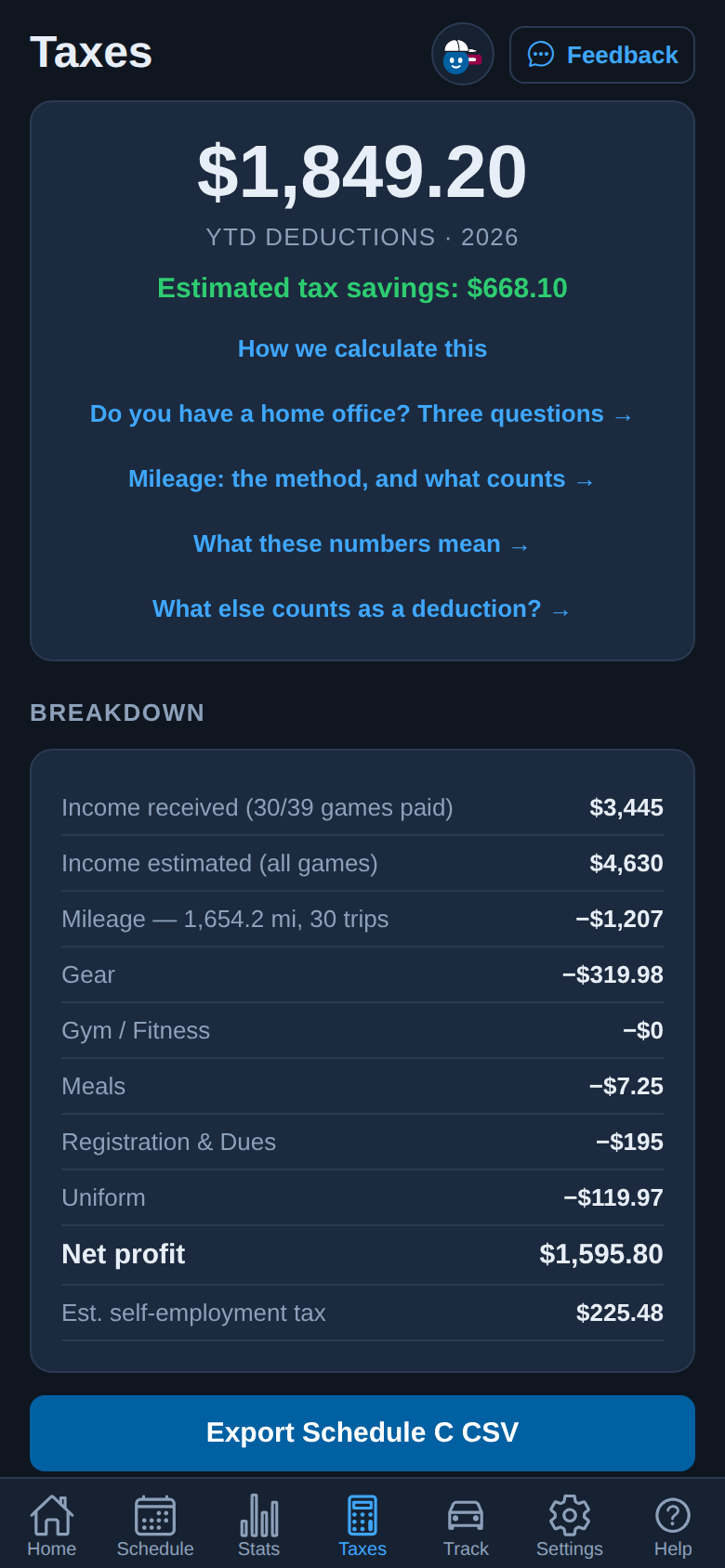
RefTraq’s Taxes screen on a phone: the year’s deductions and estimated tax savings at the top, the breakdown from income received down to the self-employment tax, the Export Schedule C button, and the tab bar from Home to Help.
The real Taxes screen, in demo mode. The money is made up.

A season in RefTraq, in 22 seconds

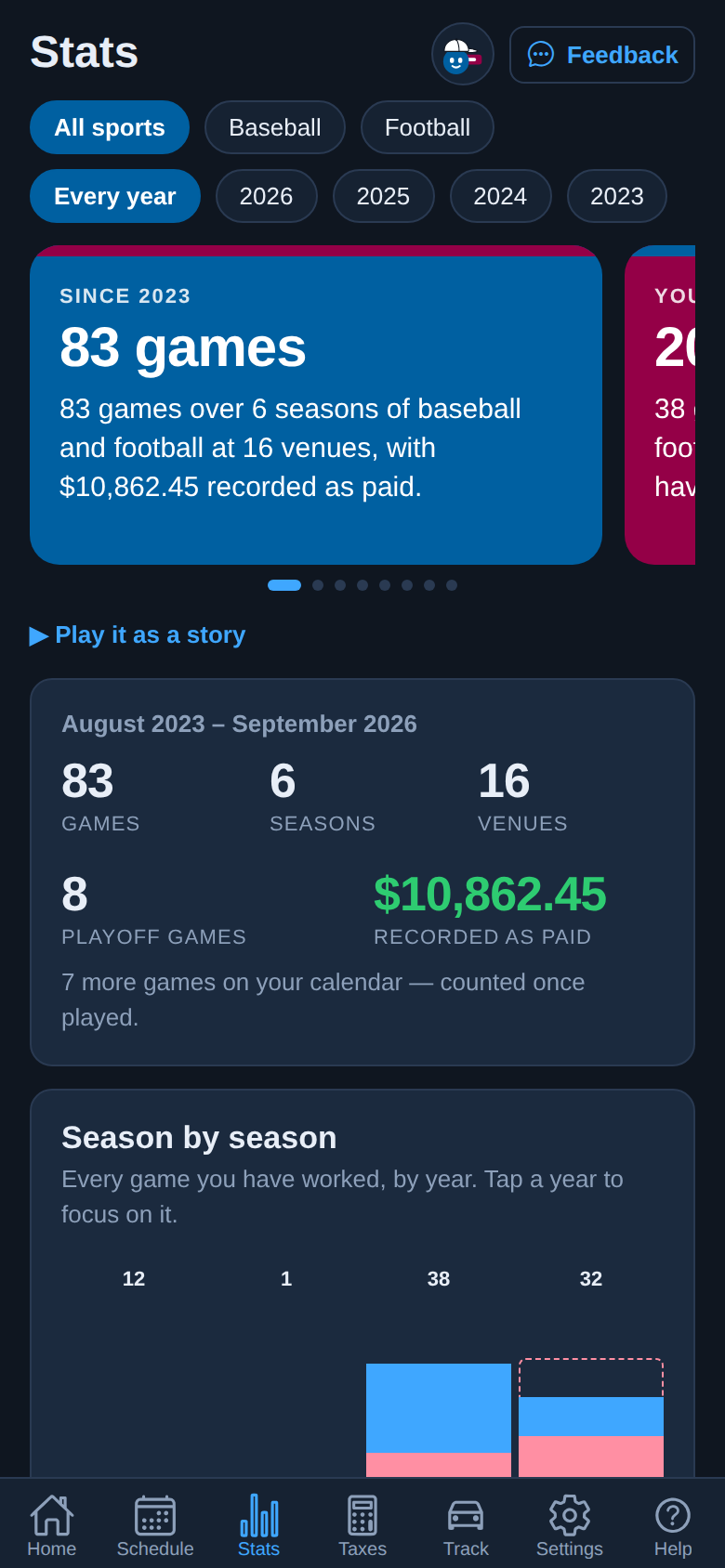
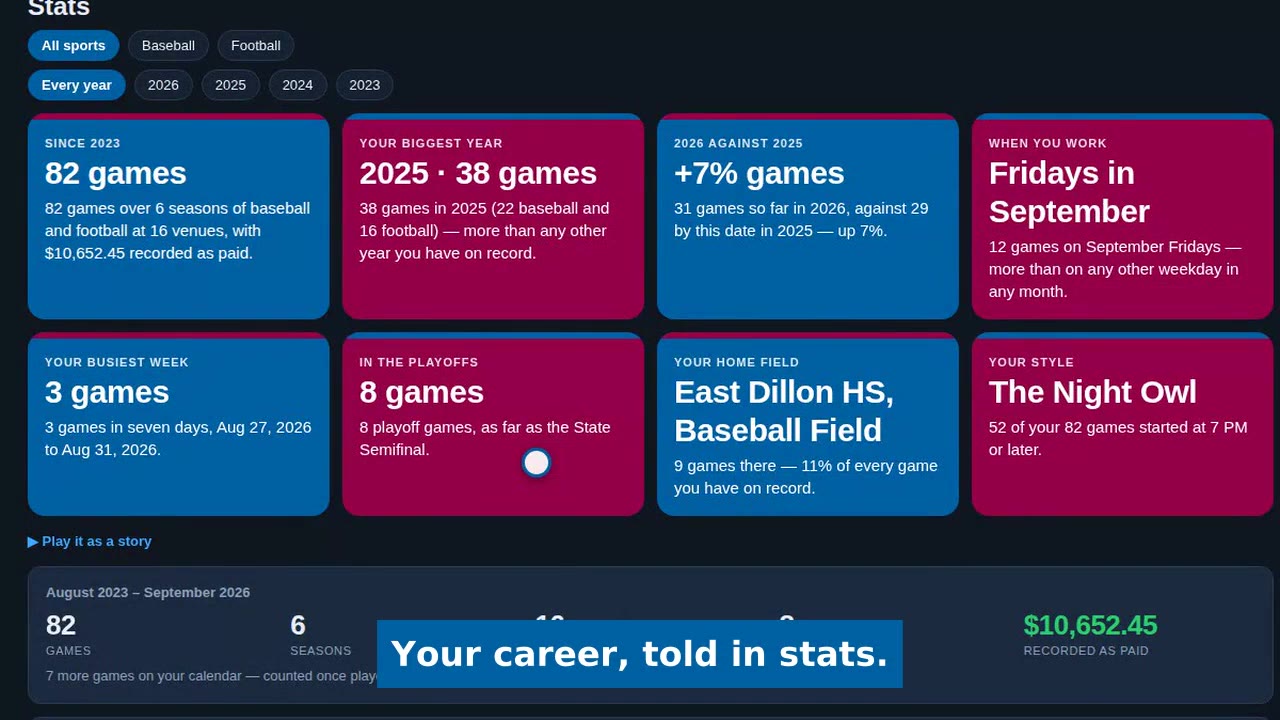
RefTraq's Stats tab: 82 games over six seasons, the biggest year, this year against last, and the playoff games.

Recorded in RefTraq’s demo mode. The officials, schools and money are made up.

Do the math on yourself

Find yourself in this table.

No averages and no “typical official”. Pick your round trip to a typical game, then how many games you work in a season.

Your season’s driving at the IRS standard rate of 76¢ a mile
Round trip per game20 games40 games60 games
20 miles$304$608$912
40 miles$608$1,216$1,824
60 miles$912$1,824$2,736
80 miles$1,216$2,432$3,648

Round trip × games × 76¢, the IRS standard mileage rate since July 1, 2026. This is a deduction, not a refund: it comes off the income you pay tax on. Which drives count depends on where the game is and whether you have a qualifying home office — the mileage guide explains it in two minutes. Not tax advice.

2008
officiating since
500+
of his own games on record
40
expense categories, Schedule-C mapped
1 click
to a CPA-ready Schedule C

Built by a working Texas football & baseball official — and running on his own decade of games first.

The real app

What it looks like on your phone.

Three screens from RefTraq’s demo mode, shot by the same recorder as the video. The officials, schools and money are made up.

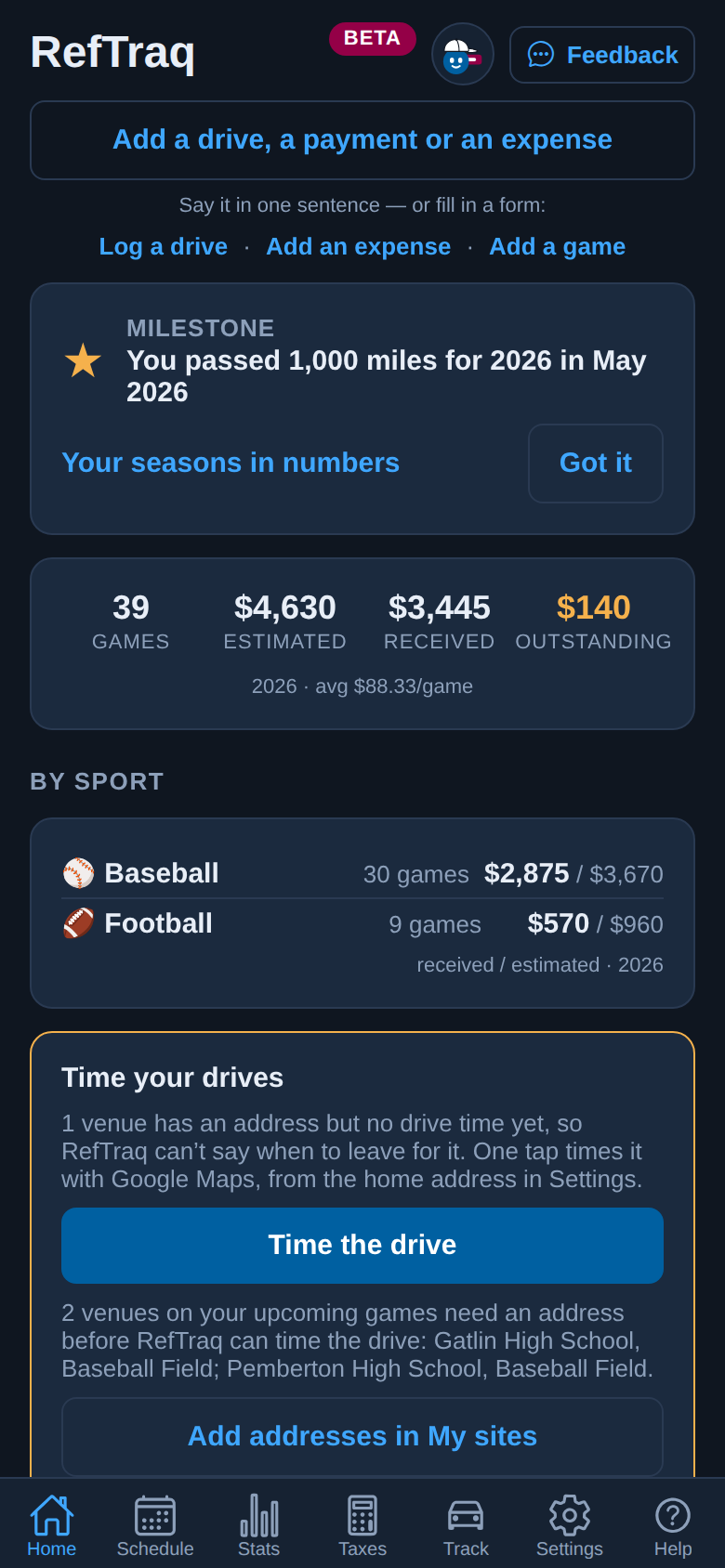
RefTraq’s Home screen on a phone: a button to add a drive, a payment or an expense in one sentence, and the season’s games, estimated pay, money received and money still owed.
Home. Add anything in one sentence, and see what the season has paid and what is still owed.
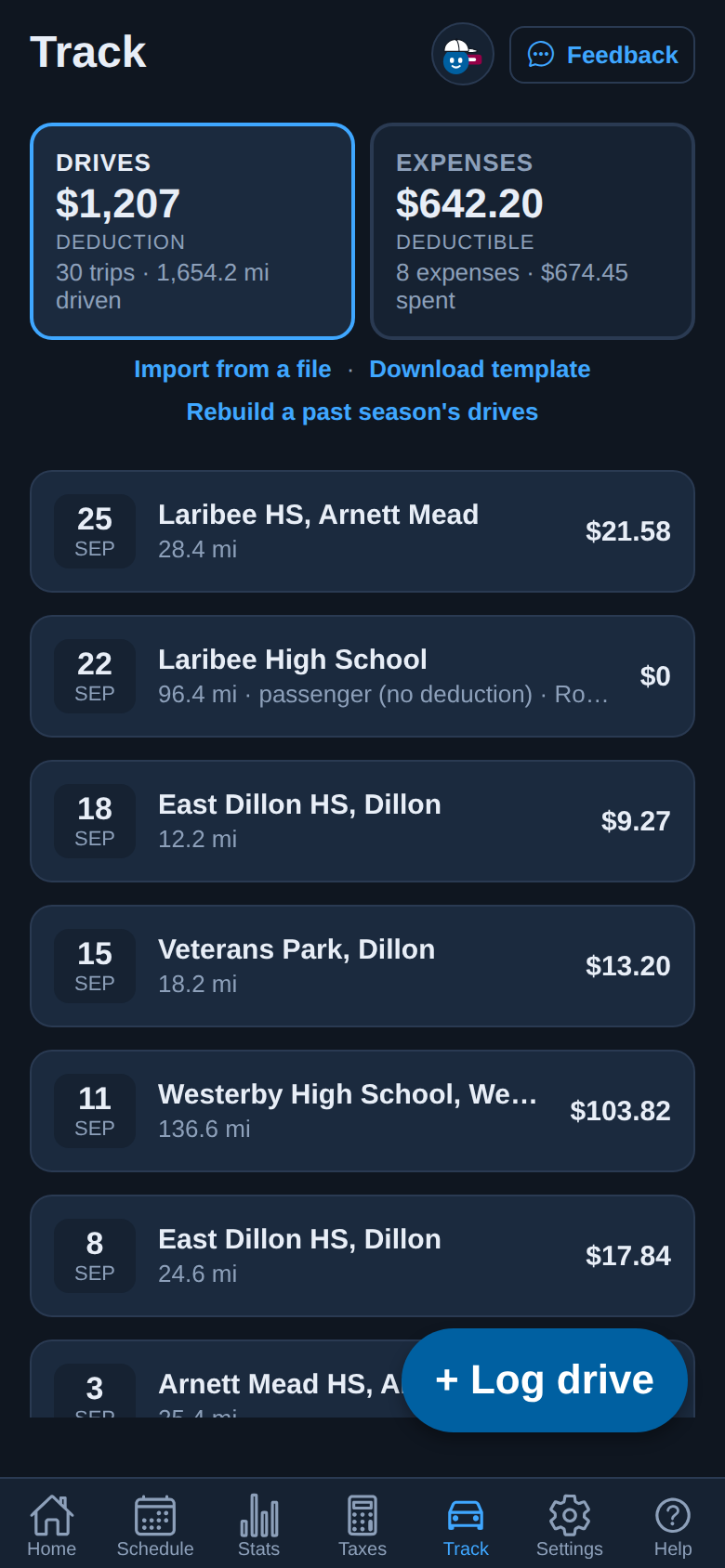
RefTraq’s Track screen on a phone: the drives deduction and the expenses side by side, then each drive with its date, place, miles and deduction.
Track. Your drives and your expenses side by side, each drive with what it’s worth.
RefTraq’s Stats screen on a phone: every game since the first season recorded, the seasons, venues and playoff games, and a chart of games season by season.
Stats. Every season you’ve worked, in one place.

Everything RefTraq does →

Pricing

Free to track. Paid to save.

Free during the beta. Pricing is announced November 1 — no surprises.

Free
$0 forever
Not a trial. None of this ever needs Pro.
  • Automatic schedule sync
  • Pay tracking: fees auto-filled, unpaid games flagged, a pay sheet for each assigner
  • Stats and your season Wrapped
  • The Taxes tab, the one-page tax meeting sheet, the Schedule C export and Who pays you
  • Everything you’ve recorded: see it, edit it, export it
Pays for itself
RefTraq Pro
$79/yr after the beta
Free for every beta official. Pricing is announced November 1.
And it’s a write-off. Pro is software for your officiating business, so it goes on your Schedule C like your dues — and RefTraq adds it to your expenses for you the day you pay. $79 costs you about $50.At the 22% bracket plus self-employment tax, the same estimate the Taxes tab uses. Not tax advice.
  • Record new drives: an IRS-format mileage log, linked to your games
  • Record new expenses, each with its receipt photo kept
  • By form, by Quick add, or from a photo of the receipt
  • Everything you record stays yours to see, edit and export, Pro or not
The app shows your estimated tax savings all season, right on the Taxes tab. Not worth it? Ask within 30 days of paying for Pro and we refund it in full.
Questions

What officials ask first.

What does it cost?

Nothing during the beta, and no credit card. Pricing is announced November 1, and we’ll tell you before anything changes — that’s in the terms. Your schedule, your pay and everything you’ve recorded stay free either way.

Does it work with my assigner?

If your assigner gives you a calendar link — Arbiter, Assignr, RefTown, ZebraWeb, Horizon Web Ref and most others do — yes: paste it once, and new games arrive on their own. Arbiter’s schedule export (.xls) works too, and any game can be added by hand.

Do you need my Arbiter password?

No. RefTraq reads the calendar link your assigner already publishes, the same one your phone’s calendar can subscribe to. It never signs in anywhere as you.

Is this tax advice? Do I still need a preparer?

RefTraq is a record-keeping tool, not a tax preparer. It keeps the records and adds them up the conservative way, then hands your preparer a one-page tax meeting sheet and a Schedule C file. Your preparer decides what goes on the return.

Does it run on my phone?

Yes, in any phone or computer browser at app.reftraq.com, and you can put it on your home screen like an app. There is no password: you sign in with a link we email you. iPhone and Android apps are in development.

What happens to my data?

It’s yours. Export your Schedule C summary and mileage log to CSV whenever you like, Pro or not, and delete your account from Settings. The privacy policy says what is kept and why.
Get in before the season does.

Sign up with your email, paste in the schedule feed you already get from your assigner, and RefTraq starts building your season P&L. While the beta is small you get setup help directly from the founder — a working official himself.

Create your free account →

Rather talk to a human first? Email the founder.

Free during beta · no credit card · no password to remember — we email you a one-tap link. Runs in any browser today; the iOS and Android apps are in development. Your data is yours: everything you record stays free to see, edit and export, Pro or not — your full Schedule C summary and mileage log to CSV whenever you want.